Interactive Product Visualization · Technical Education

Interactive 3D ExperiencesExplore Beyond the Surface.

VanCole develops interactive 3D experiences that allow users to explore complex equipment, inspect individual components, visualize internal systems and understand how products work.

From industrial machinery and electronics to professional camera systems, our interactive experiences transform technical information into engaging digital demonstrations.

Live interactive experiences
7
Mouse and touch controls
Desktop + Mobile
Runs in the browser
No App
Link, embed or full-screen
Website-Ready

Live Interactive Experiences

seven Experiences. One Standard.

Launch any model below in its own viewer—rotate it, take it apart, inspect individual components and follow the systems inside. Each experience loads only when you open it, so this page stays fast.

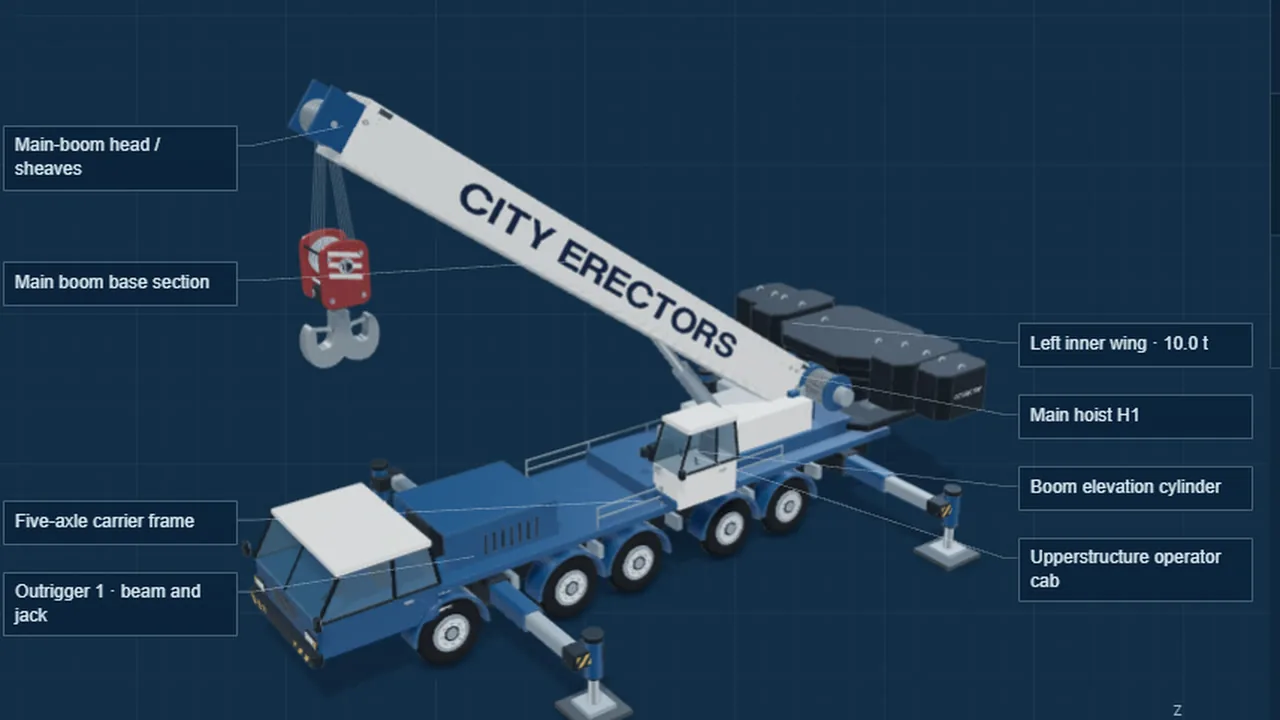
VanCole's Anatomy of a Mobile Crane — interactive 3D Tadano AC 5.250-2 model in City Erectors livery with labeled boom, hoist, counterweight and outrigger components Experience 01 · Launch in Browser
Experience 01Industrial Machinery & Mechanical Systems

VanCole’s Anatomy of a Mobile Crane

Explore the mechanical systems and individual assemblies of a mobile crane through interactive disassembly, component inspection, exploded views and internal visualization.

72 Documented PartsLive ControlsExploded & X-Ray
  • Interactive component exploration across 9 mechanical & hydraulic assemblies (72 documented parts)
  • Live equipment controls: boom elevation, extension, slew, hoist, outriggers, steering & 4 pose presets
  • 360° orbit, pan, scroll/pinch zoom & Front, Side, Top, and Iso camera views
  • Complete, Cutaway, Top Off & X-Ray visualization modes
  • Exploded View with continuous assembly separation & reassembly
  • Clickable component identification with engineering details & hydraulic flow visualization

Based on published Tadano AC 5.250-2 specifications. Internal geometry is interpreted for education.
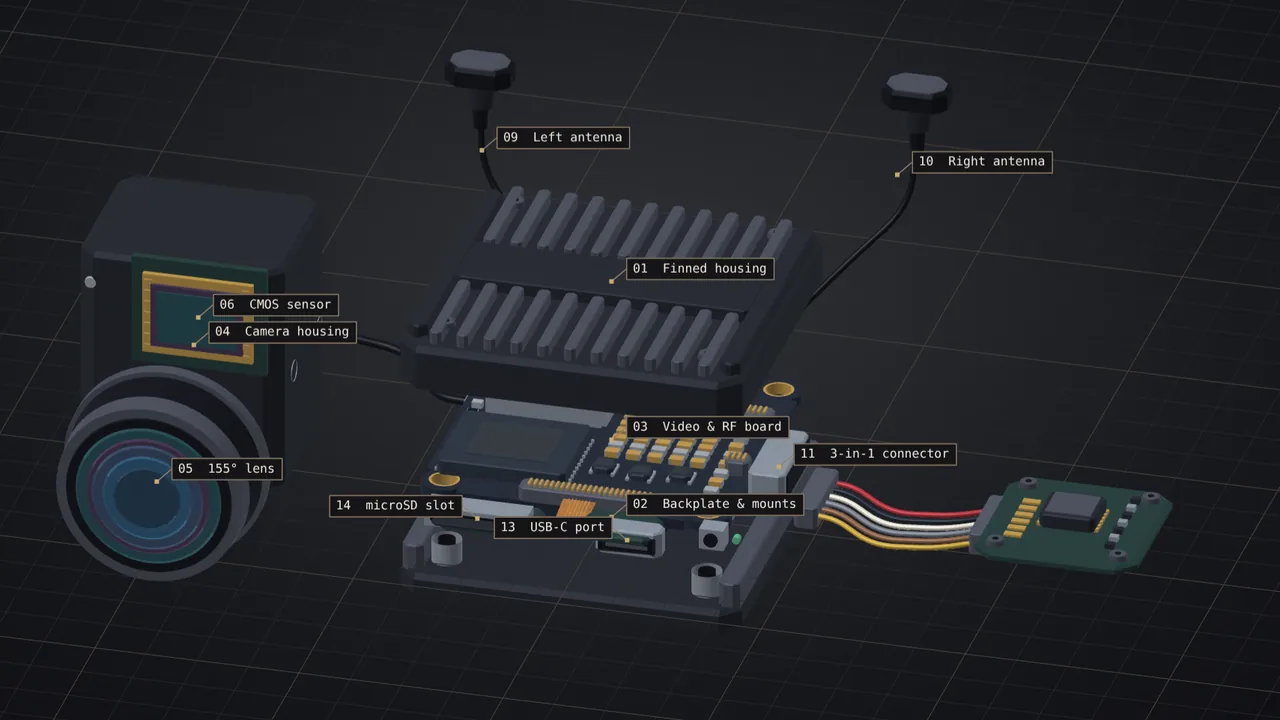
VanCole's Anatomy of the DJI O4 Air Unit Pro — exploded interactive 3D view showing the finned housing, video and RF board, camera housing, CMOS sensor, 155° lens, antennas and 3-in-1 harness Experience 02 · Launch in Browser
Experience 02Electronics & FPV Technology

VanCole’s Anatomy of the DJI O4 Air Unit Pro

Explore the internal electronics, imaging system, circuit board architecture and digital signal paths of the DJI O4 Air Unit Pro through interactive 3D visualization.

PCB Layers & ViasSignal PathsBlueprint Mode
  • Interactive component disassembly
  • Individual component inspection
  • Circuit board exploration
  • Copper trace visualization
  • Individual PCB layer inspection
  • Via visualization
  • RF shield removal
  • Camera and lens disassembly
  • Optical light paths
  • Electrical power and communication paths
  • Rendered and engineering blueprint display modes

Independent educational visualization. Exterior and published specifications follow DJI documentation; board placement follows FCC filing photos. Internal copper layers, signal routes and optics are illustrative reconstructions—not official DJI engineering drawings.

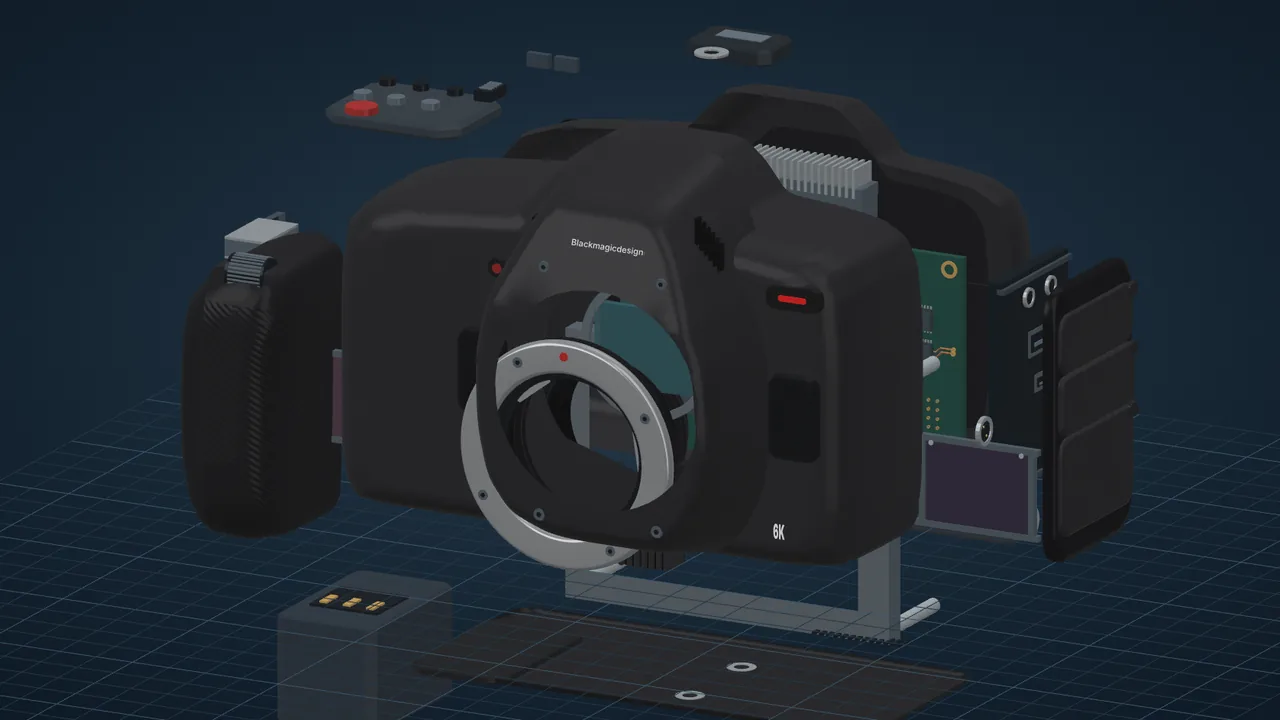
VanCole's Anatomy of the Blackmagic Pocket Cinema Camera 6K Pro — exploded interactive 3D view of the camera body, EF mount, handgrip, rear display, circuit board and battery Experience 03 · Launch in Browser
Experience 03Professional Imaging & Optical Systems

VanCole’s Anatomy of the Blackmagic Pocket Cinema Camera 6K Pro

Explore the internal architecture of a professional cinema camera, from its optical system and internal ND filters to its image sensor, electronics and mechanical assemblies.

Optical StackInternal NDSensor Education
  • Interactive mechanical disassembly
  • Individual component inspection
  • Camera housing removal
  • Optical stack exploration
  • Lens and aperture demonstrations
  • Internal ND filter visualization
  • Image sensor education
  • Circuit board inspection
  • Electrical and recording signal paths
  • Adjustable optical demonstration parameters
  • Studio-lit rendering and blueprint grid display options

Independent educational visualization. Exterior and published specifications follow Blackmagic Design documentation; identified part markings follow a documented BMDPCB720C teardown. Board placement, copper routes and the optical mechanism are illustrative reconstructions—not official Blackmagic Design engineering drawings.

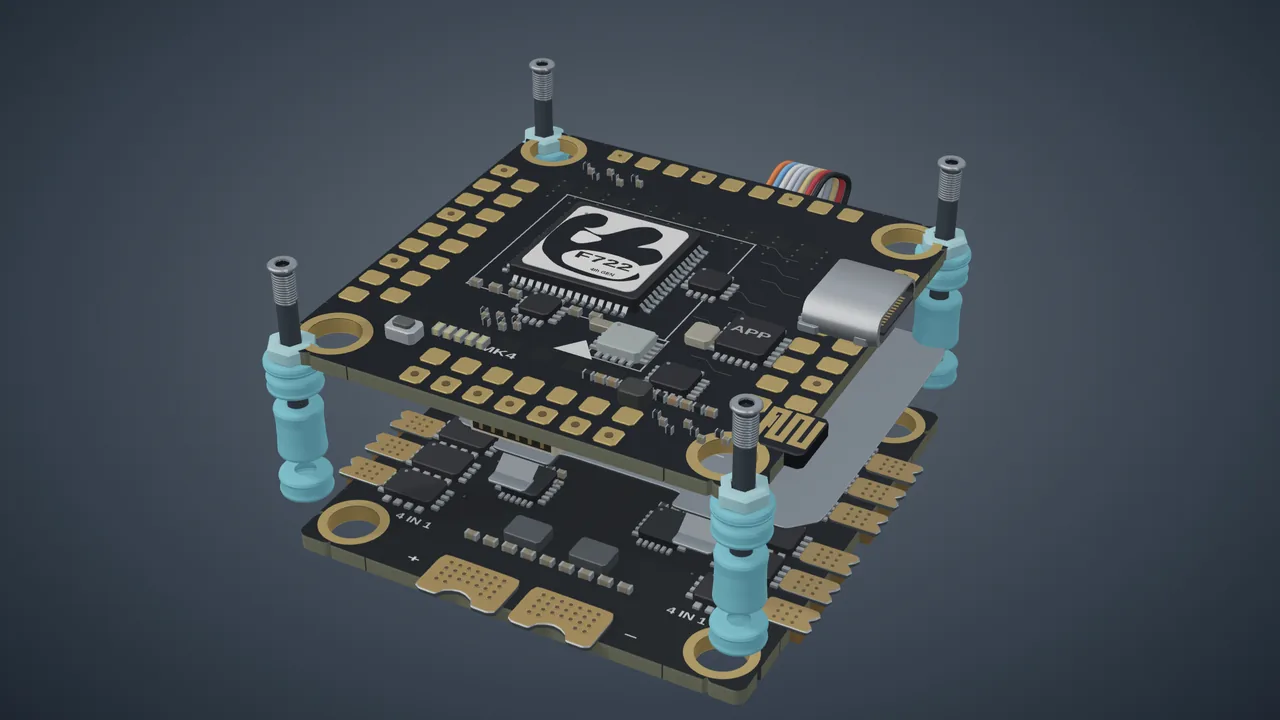
VanCole's Anatomy of the Mamba MK4 Stack — exploded interactive 3D view of the F722 APP flight controller above the 4-in-1 ESC with stack screws, cyan soft mounts and the FC–ESC harness Experience 04 · Launch in Browser
Experience 04FPV Flight Electronics

VanCole’s Anatomy of the Mamba MK4 Stack

Explore a Diatone Mamba MK4 FPV flight stack, from the F722 APP flight controller and ICM-42688-P IMU to the 4-in-1 ESC, its EMI shield, PCB layers and power paths, through interactive 3D disassembly.

F722 + 4-in-1 ESCPCB LayersPower & Phase Paths
  • Interactive stack disassembly
  • Individual component inspection
  • Flight-controller and ESC board views
  • EMI shield removal
  • Board flip and underside inspection
  • Individual PCB layer inspection
  • FC → ESC command path
  • Battery power distribution path
  • Motor-phase output paths
  • F55_128K and F65_128K ESC options
  • 30.5 × 30.5 mm mounting dimensions
  • Studio and engineering blueprint render styles

Independent educational visualization. Exterior and visible layout are reconstructed from product photos and Diatone references; package identities and pad locations are labeled only as far as those references support. PCB layers and animated paths are schematic—not official Diatone engineering drawings.

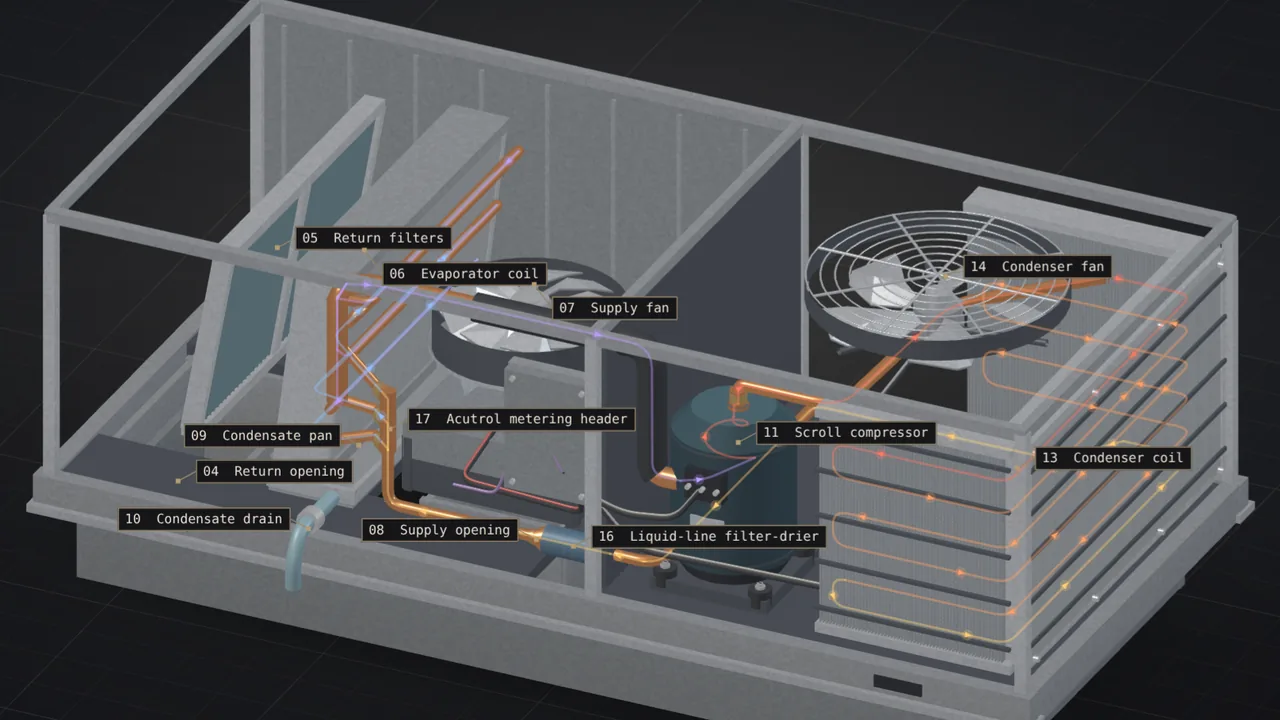
VanCole's Anatomy of a Rooftop Unit — interactive 3D cutaway of a commercial rooftop air-conditioning unit showing refrigerant flow through the evaporator coil, scroll compressor, condenser fan and condenser coil Experience 05 · Launch in Browser
Experience 05HVAC & Mechanical Systems

VanCole’s Anatomy of a Rooftop Unit

Explore a commercial rooftop air-conditioning unit in interactive 3D. Follow the refrigerant through the cooling cycle, inspect the compressor and coils, and see how airflow, drainage, and refrigerant recovery work.

Refrigerant CycleCutaway & X-Ray25 Components
  • Refrigerant flow, airflow, condensate drainage, electrical overview & recovery modes
  • 25 selectable internal components with Cutaway, X-Ray & Exploded inspection views
  • Based on the Carrier WeatherMaker 50FC-A05 with live orbit, zoom & fullscreen controls

Educational visualization based on the Carrier WeatherMaker 50FC-A05. Internal geometry and equipment configurations are illustrative.

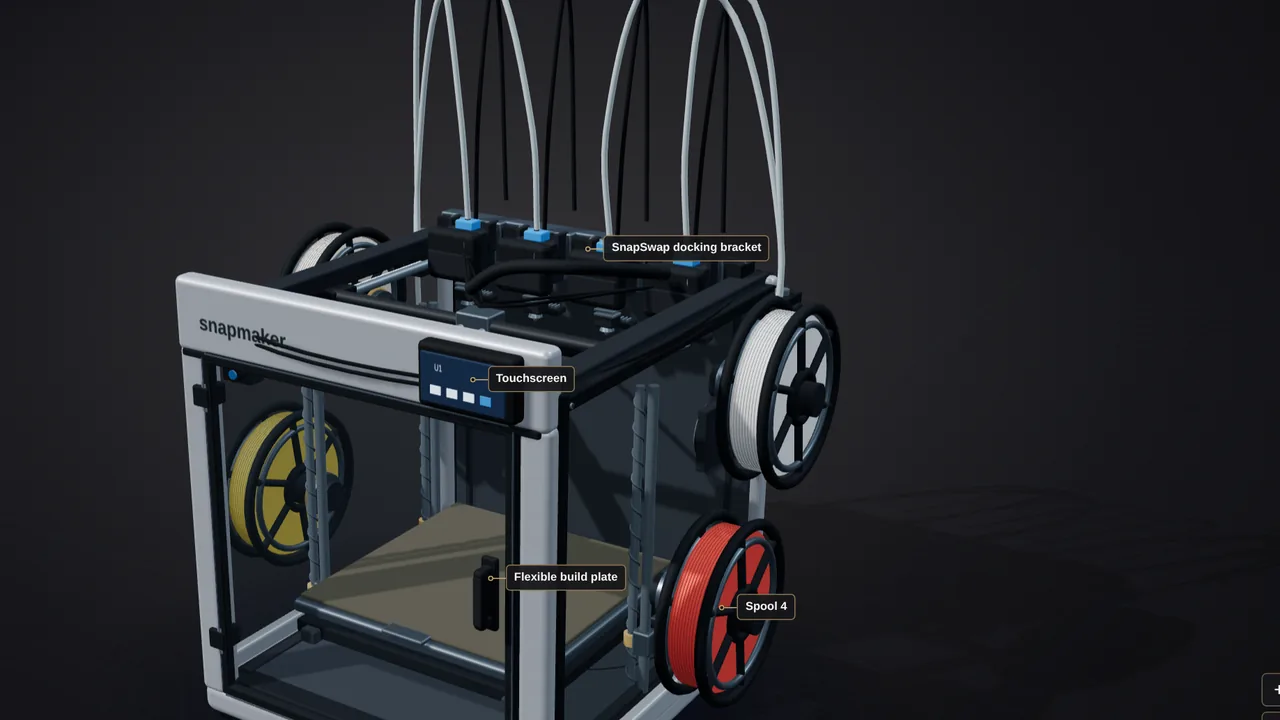
Interactive 3D Printer Blueprints — Snapmaker U1 model in the VanCole WebGL viewer with labeled SnapSwap docking bracket, touchscreen, flexible build plate and filament spools Experience 06 · Launch in Browser
Experience 06Manufacturing Equipment & Mechanisms

Interactive 3D Printer Blueprints

Explore the mechanics of each printer in 3D. Switch between machines, zoom into their toolheads, and select individual components to see what they do.

4 Printer ModelsToolhead Close-UpsComponent Selection
  • Switch in-viewer between Snapmaker U1, Bambu Lab H3C, Bambu Lab A1 & Bambu Lab P1S
  • Toolhead close-up inspections, U1 tool-change animations, extrusion & thermal views
  • Selectable mechanical components with Cutaway, X-Ray, Exploded & fullscreen controls

Educational visualization. Reference drawings and model limits are documented inside the experience.

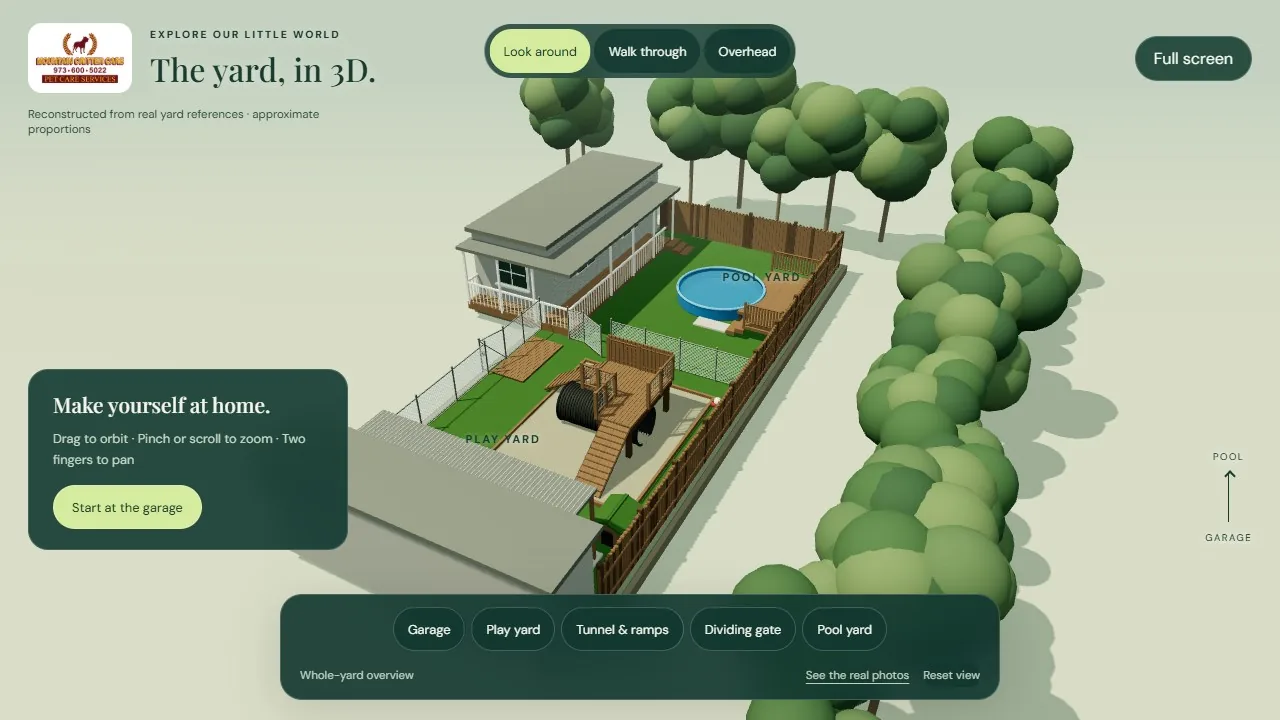
Mountain Critter Care interactive 3D yard tour showing the garage, fenced turf play yard, agility ramps and pool yard in the browser Experience 07 · Launch in Browser
Experience 07Facility & Property Visualization

Mountain Critter Care — Interactive 3D Play Area

An interactive 3D recreation of an outdoor dog play area, giving prospective customers the opportunity to explore the facility and familiarize themselves with the environment before visiting or booking.

Client ProjectWalk-Through ModeFacility Tour
  • Interactive 3D facility tour of the covered garage overhang, fenced turf play yard, agility tunnel, ramps & separate pool yard
  • Look Around (360° orbit & zoom) and Walk Through first-person navigation modes
  • Preset camera views: Overhead, Garage, Play Yard, Tunnel & Ramps, Dividing Gate & Pool Yard
  • Full-screen browser-based exploration with zero app download required

Reconstructed from real yard references with approximate proportions.

VanCole’s equipment anatomies are independent educational visualizations. They are not affiliated with, sponsored by or endorsed by the equipment manufacturers, and they are not official engineering drawings. Each experience separates documented manufacturer specifications from illustrative internal reconstruction and links to its references.

For Manufacturers, Distributors & Technical Teams

Interactive 3D Solutions for Complex Products

VanCole builds custom interactive experiences for businesses whose products are hard to explain with photos alone. Each project is scoped around your equipment, your audience and where the experience will live—as a standalone experience or paired with custom Web Design, Cinematic Content and SEO & AEO.

Interactive Product Demonstrations

Allow customers to explore equipment, inspect individual components and understand product features directly through a website.

Technical Education & Training

Create interactive educational experiences that explain mechanical systems, electronics, optical assemblies and equipment operation.

Industrial & Mechanical Visualization

Present complex machinery through exploded assemblies, component inspection and interactive system demonstrations.

Digital Product Documentation

Transform technical documentation into accessible interactive experiences with labeled components, explanatory information and internal system visualization.

Website Integration

Integrate custom interactive 3D experiences directly into business websites, product pages and dedicated digital presentations.

Industries We Build For

  • Heavy equipment
  • Construction
  • Manufacturing
  • HVAC & mechanical systems
  • Electronics
  • Drone technology
  • Professional imaging equipment
  • Technical education
  • Equipment distributors
  • Facilities & physical spaces

Built for Fast Browser Performance on Desktop & Mobile

  • Opens directly in desktop and mobile browsers—no app store download or plugins required
  • Lazy-loaded 3D scenes keep your main website fast while delivering rich WebGL interaction on demand
  • Helps prospective clients inspect equipment, layouts, and facilities before requesting a quote or booking
  • Available as a standalone interactive deliverable or integrated seamlessly into a custom VanCole website

Questions & Answers

Interactive 3D FAQ

What is an interactive 3D product experience?

It is a browser-based 3D model that visitors can rotate, zoom and take apart. Depending on the product, it can include selectable components with descriptions, cutaway and exploded views, animated system paths such as power, signal, refrigerant or light, and guided explanations. It opens on a web page — no app download or plugin is required.

Can individual mechanical components be inspected?

Yes. In the equipment experiences — the mobile crane, DJI O4 Air Unit Pro, Blackmagic 6K Pro, Mamba MK4 stack, rooftop unit and 3D printers — components can be selected on the model or from a parts list to show what each part is and what it does. Visitors can also separate the model into an exploded view, and the DJI, Blackmagic and Mamba experiences let them isolate a part or pull individual pieces away from the assembly by hand.

Can interactive models be embedded into an existing website?

Yes. Each experience is a self-contained web page that can be linked from a product page, opened in a full-screen viewer, or embedded inside an existing page. The rooftop unit and 3D printer experiences on this site are embedded inside VanCole pages, and the Mountain Critter Care yard tour runs on the client’s own website.

Can VanCole create interactive training demonstrations?

Yes. The existing experiences already include teaching modes — the refrigerant cycle in the rooftop unit, power and communication paths in the DJI O4 Air Unit Pro, PCB layer walkthroughs in the DJI and Mamba models, battery-power and motor-phase paths in the Mamba MK4 stack, and lens, ND filter and sensor lessons in the Blackmagic 6K Pro. Training content is scoped to the equipment and the audience for each project.

What information is required to develop a custom model?

Helpful starting material includes product photos from several angles, overall dimensions or drawings, specification sheets or manuals, the components you want to highlight, and the systems or processes you want to explain. Where internal details are not documented, VanCole can build clearly labeled illustrative reconstructions so documented specifications stay distinct from interpretation.

Can the experiences work on mobile devices?

Yes. The experiences run in modern mobile browsers with touch controls — drag to orbit, pinch to zoom and tap to select components — and their layouts adapt to smaller screens. Full-screen mode is available wherever the browser supports it, and very detailed models perform best on recent devices.

Custom Scoped · Standalone or Website Add-On

What Could Your Customers Explore?

From heavy machinery and electronics to custom products and physical spaces, VanCole creates interactive digital experiences designed around your business. Tell us what you want people to understand, and we’ll scope the right experience.